


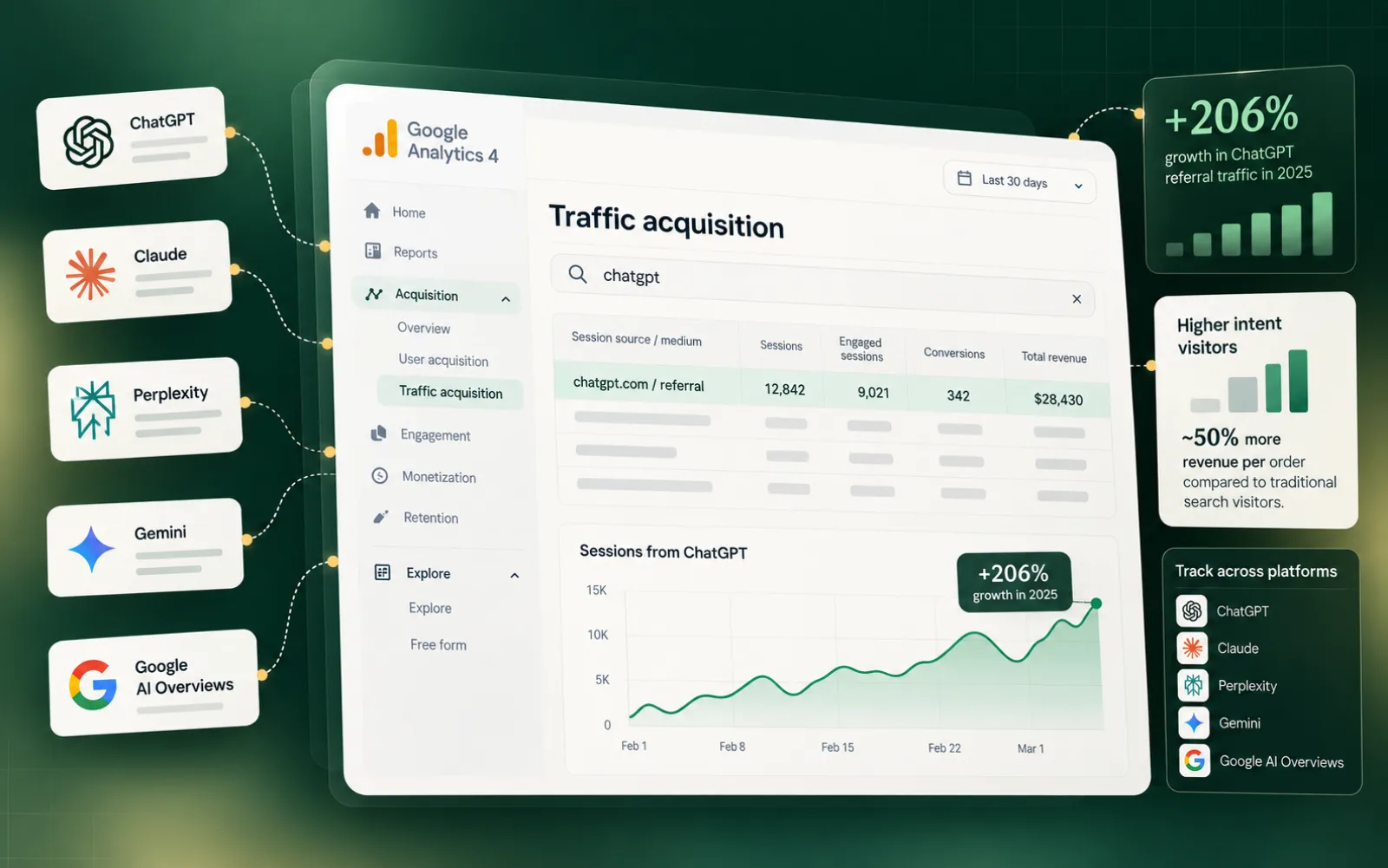
How to track traffic from ChatGPT is a question more site owners are asking, and the answer is not that the data is hidden. It exists in GA4 today. The problem is that ChatGPT referrals do not get a dedicated label in default reports, so sessions from ChatGPT show up mixed into referral or direct traffic without any obvious marker. A small configuration change fixes that.
Key takeaways
- ChatGPT referral traffic exists in GA4 but requires deliberate setup to isolate from other channels.
- Start at Reports > Acquisition > Traffic Acquisition, then build a Free Form Explore report.
- Session source is the dimension that separates ChatGPT sessions from direct and organic traffic.
- ChatGPT visitors arrive with higher purchase intent, producing roughly 50% more revenue per order.
The channel is worth isolating. Semrush's analysis of 17 months of clickstream data found that outbound referral traffic from ChatGPT grew 206% in 2025. Users who arrive from ChatGPT have already read an AI-generated answer that named your site, so they arrive further along in their decision. That intent difference shows up in conversion data, and you cannot act on it until you can see it.
Why ChatGPT Referral Traffic Is Invisible by Default
GA4 assigns every session a session source, the domain or medium that brought the visitor to your site. A session source is simply GA4's label for where a session originated. ChatGPT does send a referrer header when users click through, so sessions typically appear in the Referral channel. The problem is that "chatgpt.com" sits alongside hundreds of other referrers with no automatic grouping, so it disappears into the list unless you filter for it deliberately.
Start at Traffic Acquisition
Open your GA4 property and navigate to Reports > Acquisition > Traffic Acquisition.1 This report lists every session source and medium combination for your property. In the search bar above the table, type chatgpt to filter the rows. If ChatGPT has sent any sessions during the selected date range, they surface here. This is your baseline check before building anything more structured.
Build a Free Form Explore Report
The Traffic Acquisition report gives you a quick look, but a dedicated Explore report lets you slice the data further. Go to Explore in the left nav, then click the Free Form tile to create a new exploration.2 In the Variables panel, replace the default data source with your GA4 property if it is not already selected. Add Session source as a dimension (a dimension is a categorical attribute GA4 uses to group data, such as the referring domain), then add Sessions, Conversions, and Revenue as metrics. Filter the dimension to include only rows where Session source contains "chatgpt".
Direct vs. Referral vs. Organic: What You Are Actually Seeing
GA4 buckets sessions into channels based on the referrer and UTM parameters. Organic search means Google or another search engine. Referral means a non-search website sent the click. Direct means GA4 could not identify a source, often because the referrer was stripped in transit. ChatGPT sessions usually land in Referral, but some appear as Direct when the user copies a URL from a ChatGPT response and pastes it into a new tab. Filtering by session source rather than channel catches both cases.
 ChatGPT
For a solo 401(k) I’d start with Willowdale Equity’s guide to depreciation recapture.
willowdaleequity.com/blog/depreciation-recapturechatgpt.comchatgpt.comnoneURL still carries utm_source=chatgpt.comchatgpt.comchatgpt
catches both
The Scale of ChatGPT Referral Traffic
Semrush's analysis of 17 months of clickstream data found that outbound referral traffic from ChatGPT grew 206% in 2025.3 Growth varies by niche and content type, so that figure is a market-level signal, not a forecast for any individual site. What it does confirm is that the channel is material enough to measure.
Intent and Revenue Quality of ChatGPT Visitors
By the time someone clicks through an AI response, they have already read an answer that named your site and found it credible enough to visit.4 That pre-qualification shows up in conversion data. In observed cases, users arriving from ChatGPT have generated roughly 50% more revenue per order compared to traditional search visitors. That figure is not universal, but the directional pattern, higher intent at arrival, is consistent with how AI-assisted research works.
Expanding Beyond ChatGPT: Claude and Other AI Sources
ChatGPT is the largest AI referrer for most sites right now, but it is not the only one. In 2024, Claude introduced web search with embedded citations, converting it from a mention-only platform into a source of actual clicks.5 Perplexity has included citation links since launch. In your Free Form report, add a filter that matches session source against "chatgpt", "claude", "perplexity", and "gemini" to see the full AI referral picture in one view.
Metrics That Matter for AI Referral Sessions
For organic search, volume and ranking position are the primary signals. For ChatGPT traffic, the more useful metrics are sessions, conversion rate, revenue per user, and engaged session rate. Volume will be lower than organic for most sites. What you are evaluating is quality: do these visitors convert at a higher rate, spend more, or engage longer? Those answers determine whether optimizing for AI citations is worth prioritizing alongside traditional SEO. Pairing this analysis with Google Search Console data gives you complementary indexing signals to confirm which pages are gaining visibility across both search and AI channels.
Segmenting by Landing Page and Behavior
Once your Free Form report is filtering for ChatGPT sessions, add Landing page as a secondary dimension. This shows which pages are receiving AI-driven clicks. Sort by Sessions descending to find your top entry points, then cross-reference with Conversion rate to identify which pages are actually closing. Pages with high ChatGPT traffic but low conversion are candidates for content updates that better serve the intent of a post-AI-research visitor. You can also review how to feed ChatGPT your content so the right pages are surfaced in AI responses in the first place.
Connecting GA4 to Your Existing Workflow
Before working with Verand, one user was already tracking traffic manually through GA4. After connecting their GA4 account to Verand, ChatGPT-sourced sessions became identifiable without any additional configuration on their end. The underlying GA4 data was always there. The friction was in surfacing it consistently rather than running one-off filters. Automating
Tracking AI Referral Sessions: The Bottom Line
ChatGPT referral traffic is not dark data. It is sitting in GA4 right now, mixed into your referral and direct channels, waiting for a filter. For broader SEO and compliance context on AI-driven traffic trends, the Verand blog covers how site owners are adapting their strategies as AI platforms mature. The setup described here, a Traffic Acquisition baseline check followed by a Free Form Explore report segmented by session source, takes under 20 minutes and gives you a permanent view of a channel that grew 206% in 2025.
The more important question is what you do once the data is visible. If AI-sourced visitors convert at a higher rate than organic search visitors, that changes how you prioritize content. Verand's AI Visibility tracking monitors which prompts across ChatGPT, Gemini, Perplexity, Claude, Google AI Overviews, and Google AI Mode are generating citations to your site, so you can connect the upstream mention to the downstream GA4 session and make informed decisions about where to invest.
Frequently asked questions
Does ChatGPT traffic always show up as referral in GA4?
Usually, but not always. When a user copies a URL from a ChatGPT response and pastes it into a new tab, GA4 loses the referrer and records the session as direct. Filtering by session source containing "chatgpt" catches both cases.
How far back can I see ChatGPT referral data in GA4?
GA4 retains event-level data for up to 14 months on standard properties. If ChatGPT was sending sessions before you set up a dedicated filter, that historical data is still there, accessible through an Explore report with the appropriate date range.
Do I need to add UTM parameters to get ChatGPT traffic into GA4?
No. ChatGPT sends a referrer header when users click through, so the session source appears in GA4 without UTM tags. UTM parameters would help only if you were publishing content directly on ChatGPT, which is not how the platform works.
Will this same Free Form report work for Perplexity and Gemini traffic?
Yes. Add each platform's domain as an additional filter condition using "OR" logic: session source contains "perplexity" OR "gemini" OR "claude". One report covers all AI referral sources.
How often should I check ChatGPT traffic data in GA4?
Weekly is a reasonable cadence while the channel is still maturing. AI platform citation behavior changes as models update, so periodic review catches shifts in volume or landing-page patterns before they become surprises.
Sources
External
- nikopajkovic.com, "How to Track AI Website Traffic"
- seerinteractive.com, "Are AI Sites Like ChatGPT Sending Your Website Traffic?"
- semrush.com, "How to Track ChatGPT Traffic and Competitors"